A step-by-step guide to integrate ChatGPT into your system

Picture of Dam LyLy
저자
게시됨
6 mins read
Table of Contents

Chatbots have gained tremendous popularity due to their ability to provide automated and personalized customer interactions. The development of ChatGPT by OpenAI has emerged as a phenomenon in the world of chatbot technology. This in turn has prompted many businesses to explore the integration of ChatGPT into their websites. If you’re ready to enhance your customer service strategy and unlock the benefits of ChatGPT, let’s dive into the detailed process of integrating this powerful language model into your system.

Understanding ChatGPT and AI chatbots

ChatGPT utilizes deep learning techniques and natural language processing to generate human-like responses to user queries. The latest version of ChatGPT is GPT-4, representing a significant advancement compared to previous models like GPT-3.5. With a large multimodal model that takes in both images and text and responds in text, it performs at a human level on a wide range of professional and academic benchmarks. It is anticipated that ChatGPT4 will exhibit enhanced contextual understanding, improved response coherence, and reduced instances of generating incorrect or nonsensical answers.

AI chatbots integrated with ChatGPT leverage the power of machine learning and natural language processing. They can understand and generate responses based on the context of the conversation. With the ability to process vast amounts of text data, AI chatbots can provide more accurate and nuanced answers. They also learn from user interactions and improve over time, offering a more personalized and engaging experience.

Leveraging ChatGPT for enhanced customer service

Integrating ChatGPT into your customer service strategy can bring several benefits and improve overall customer satisfaction. Real-world examples and statistics demonstrate the positive impact of ChatGPT-powered chatbots on customer service, making them a valuable tool for businesses seeking to enhance customer experiences.

  • 24/7 availability: ChatGPT-powered chatbots can operate around the clock, leading to improved customer satisfaction and reduced wait times.
  • Cost efficiency: ChatGPT enables businesses to handle a large volume of customer inquiries simultaneously without the need for additional human resources. This helps reduce support costs and maintain consistent service quality while allowing human staff to allocate their time more effectively. It was estimated that businesses across all industries would save more than $8 billion annually by integrating chatbots into their call centres.
  • Faster response times: The quick turnaround time of ChatGPT enhances the overall customer experience and helps address customer issues promptly. For example, KLM Royal Dutch Airlines integrated an AI chatbot into their customer service platform, reducing their average response time from 20 minutes to a mere 1 minute.
  • Improved customer satisfaction: By offering personalized and contextually relevant responses, ChatGPT-powered chatbots can provide a more satisfying customer experience. These chatbots can understand customer preferences and needs, leading to tailored interactions that meet customer expectations. A Hubspot survey revealed that 46% of customer care representatives agreed that AI chatbots offered a more personalized experience to customers.

📌Read more: Elevate customer services with ChatGPT integration

How to integrate ChatGPT into your website

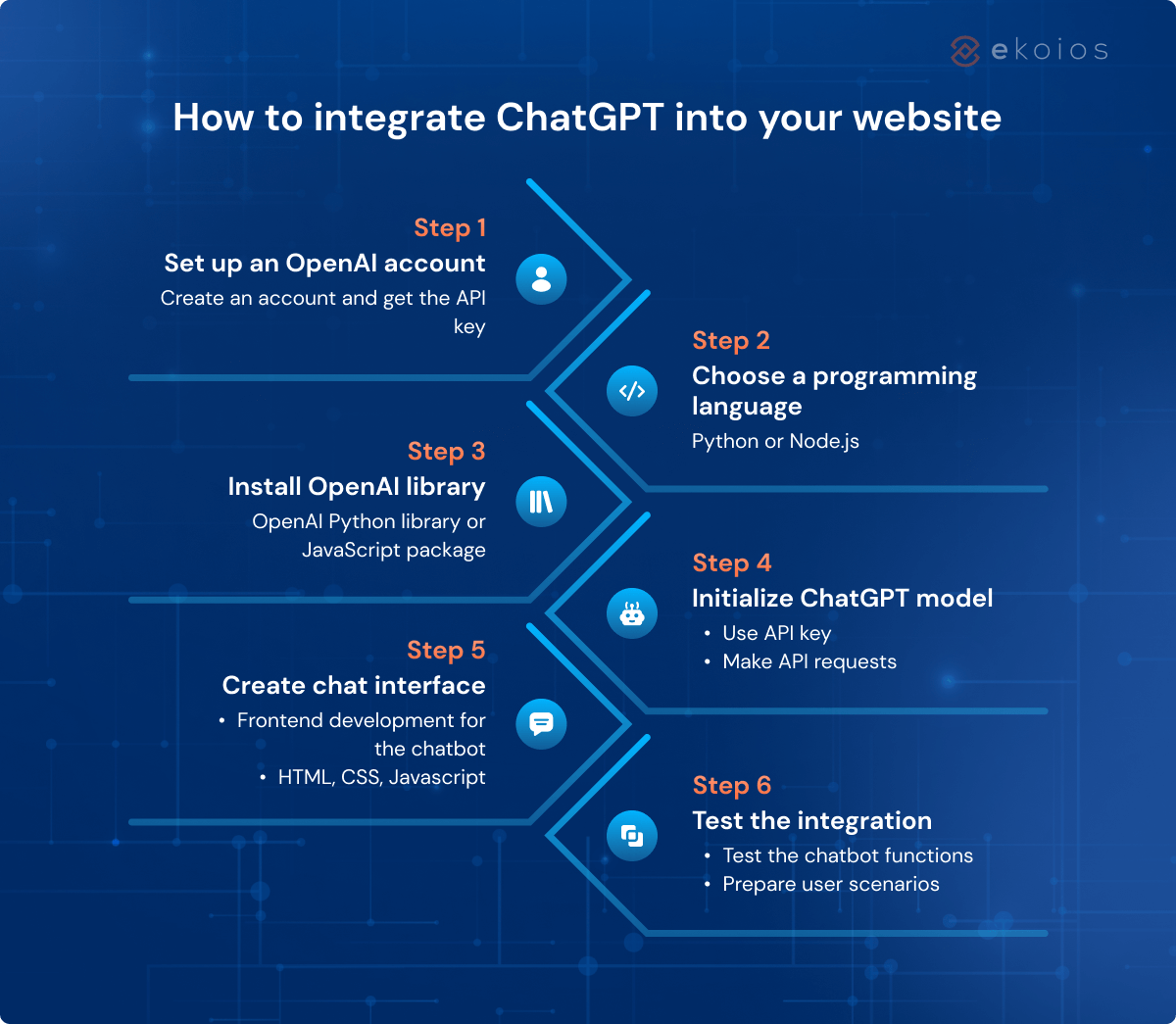
Now, let’s explore the step-by-step process of integrating ChatGPT into your website:

  • Step 1: Set up an OpenAI account
    To get started, visit the OpenAI website and create an account. This provides you with the necessary credentials to access the ChatGPT API. Once you have an account, retrieve your API key from the OpenAI dashboard. This key will be used to authenticate your API requests.
  • Step 2: Choose a programming language and framework
    Select a programming language and framework that you are comfortable with for web development. Popular choices include Python with Flask or Node.js with Express.js.
  • Step 3: Install the OpenAI Python library or JavaScript package
    Depending on your chosen programming language, install the OpenAI Python library or JavaScript package using the package manager of your choice. For example, the Python library will use the following command: /pip install openai/
  • Step 4: Initialize the ChatGPT model and make API requests (Back-end development)
    In your web application, initialize the ChatGPT model using your API key and make API requests to generate responses based on user inputs. You can customize the prompt and parameters to fine-tune the responses according to your requirements.

Refer to the following function to interact with API:

def get_response(prompt, model=“text-curie-002”, max_tokens=150):

    response = openai.Completion.create(

        engine=model, #or “your_chosen_engine”,

        prompt=prompt,

        max_tokens=50,

        n=1,

        stop=None,

        temperature=0.8

    )

    return response.choices[0].text.strip()

  • Step 5: Implement the chat interface on your website (Front-end development)
    Design and implement a user-friendly chat interface on your website where users can interact with the ChatGPT-powered chatbot. This can be achieved using HTML, CSS, and JavaScript.
  • Step 6: Test and iterate
    Thoroughly test the integration to ensure that the chatbot functions as expected. You should prepare various user scenarios and edge cases to identify and address any issues in the testing process. By actively seeking and incorporating user feedback, you can gather valuable insights to iterate and refine the implementation.

It’s important to follow best practices when integrating ChatGPT into your website. Make sure that you handle errors gracefully, implement rate limiting to prevent excessive API usage, and consider user privacy and data protection measures.

How to integrate ChatGPT into your system guide 2

Further enhancement of ChatGPT based on business-specific data

One of the key advantages of ChatGPT is its ability to be tailored to specific business needs, including incorporating a company’s unique knowledge base. By leveraging business-specific data, ChatGPT can provide more accurate and relevant responses that align with the company’s products, services, and processes.

  • Structure business-specific data: Compile relevant information about your company, including product details, FAQs, and any other pertinent information. This can involve categorizing data, creating question-answer pairs, or organizing it hierarchically so ChatGPT can comprehend and process the data.
  • Fine-tune ChatGPT with the business knowledge base: It refers to taking a pre-trained ChatGPT model and further training it on your company’s data to make it more specialized and domain-specific. This process helps ChatGPT understand the context and nuances of your business and generate responses aligned with your company’s expertise. Also, you can train it to respond to customers in a way that matches your brand identity, such as the language and tone of the brand
  • Ongoing maintenance and updates: As your company evolves, new products or services are introduced, or customer preferences change, it’s important to continually update the business knowledge base and refine the model to ensure ChatGPT remains relevant and provides accurate responses.

Use case: ChatGPT integration with NFTify

Let’s explore a specific use case of integrating ChatGPT into NFTify, developed by Ekotek.
NFTify is a leading no-code NFT marketplace with more than 20,000 users from all over the world, enabling anyone to build and launch their customized NFT marketplaces at a minimal cost. As the need for a reliable customer support solution increased, NFTify sought to develop a chatbot that could assist customers 24/7 and turned to Ekotek for their expertise in AI chatbot development.

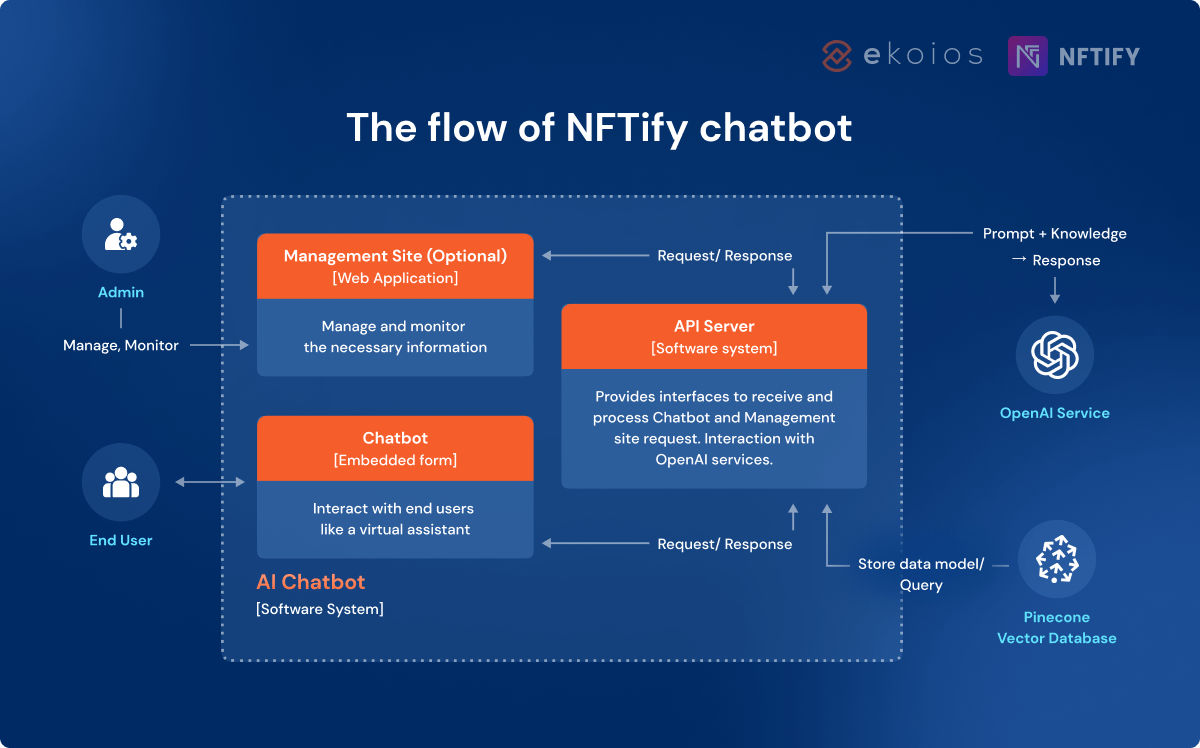
The integration process involves two main parts: creating a vector database and implementing interaction with end users.

Part 1: Creating a vector database

  1. We used the crawling method to scan NFTify sitemaps, including user guides, legal documents, and FAQs, allowing the chatbot to gather relevant information.
  2. After crawling, data processing is performed to eliminate redundant and duplicate data, supplement up-to-date data, and create reference links. This step ensures the quality and accuracy of the information stored in the database. The admin can also update internal documents to train the Chatbot regularly.
  3. Ekotek created an embedding model from the processed data using Python code and the Langchain framework, for vectorizing data. The Langchain framework facilitates interaction with large language models and leverages data from third-party sources. It enables the AI chatbot to utilize additional information from various data sources such as Google and Facebook and provides components for using language models in various real-world scenarios.
  4. The vector data is stored in a vector database (Pinecone), and the model version is saved in a relational database management system (RDBMS). With Pinecone, there are no context limits, and it efficiently retains context for a longer period.

Part 2: Implementing interaction with end users

  1. A chatbot widget was created to provide instant and automated support to users.
  2. When a user inputs a question into the chatbot, the question and the chat history are sent to the server.
  3. The server receives the question and chat history, and it makes a call to the OpenAI API (ChatGPT) to summarize them into a single question.
  4. Using Python code and the Langchain framework, the server compiles the summarized question into embedding data.
  5. The vector database (Pinecone) is queried to find the most relevant data matching the embedding data.
  6. The single question, along with the data from step 5, is sent to OpenAI (ChatGPT) to generate a refined answer.
  7. The answer from step 6 is displayed to the user on the chatbot user interface, and the chat history is stored in the RDBMS for future reference.

How to integrate ChatGPT into your system case study

📌 Explore how Ekotek developed an AI chatbot integrated ChatGPT on NFTify

Conclusion

Integrating ChatGPT into your website can elevate customer service capabilities and provide a more engaging and interactive experience for users. By following the step-by-step guide provided by Ekotek, you can effortlessly integrate ChatGPT into your website or chatbot platform of choice. Remember to explore customization options to tailor ChatGPT to your business-specific needs and leverage its potential to enhance customer interactions.

If you are considering incorporating AI Chatbot into your website or system, Ekotek experts are happy to assist. Just contact us and get a free consultation.

Take your business to new heights of success
Embrace the power of AI Chatbot now with Ekotek

Contact us

공유하기
Facebook
Twitter
LinkedIn
최고의 인사이트를 이메일로 받아보세요

    관련 게시물

    저희가 어떻게 도와드릴 수 있는지 확인해 보세요!

    베트남 아웃소싱을 고려하고 계신가요?

    베트남의 주요 21개 아웃소싱 회사를 모든 분야와 산업별로 다룬 가이드와 함께 귀사에 가장 적합한 회사를 찾아보세요.
    Table of Contents

    저희가 어떻게 도와드릴 수 있는지 확인해 보세요!

    전략 상담 예약을 위해 이메일을 남겨주세요 – 전액 무료로 제공됩니다!

      Dylan Dong Do
      최고경영자
      딜런 동 도
      Dylan Dong Do는 제품 및 ITO 기업 전반에 걸쳐 15년 이상의 경영 경험을 보유한 숙련된 리더입니다. 그의 리더십 하에 Ekotek은 5년 만에 소규모 팀에서 200명 이상의 숙련된 전문가들로 구성된 번창하는 조직으로 성장하였습니다.

      Dylan의 경력 전반에 걸쳐 그는 놀라운 성과를 달성해 왔습니다. 2009년에는 batdongsan.com.vn 개발에 핵심적인 역할을 하여 베트남 최고의 부동산 매물 플랫폼으로 자리매김하였습니다. 2018년에는 VTI의 Chief Operating Officer로 승진하여 30명 규모의 팀을 300명이 넘는 강력한 조직으로 성장시키는 데 기여하였습니다.

      기술 혁신을 일상생활에 통합하고자 하는 열망으로 Dylan Dong Do는 Ekotek을 설립하였습니다. 그는 회사의 방향성을 설정하기 위해 첨단 기술에 대한 지식과 기술을 꾸준히 업데이트하여 글로벌 트렌드에 부응하고 고객의 요구에 더욱 효과적으로 대응할 수 있도록 하고 있습니다.